


Microsoft Word 是一种流行的文字处理应用程序,用于创建各种类型的文档。这些文档可能包含多种类型的元素,包括文本、图像、表格和图表。说到在 Java 中自动创建和处理文档,您可能需要一个轻松的解决方案来在 Word 文档中创建表格。因此,在本文中,我们将探讨如何在 Java 应用程序中创建 Word 文档中的表格。
• 在 Word 文档中创建表格的 Java 库
• 在 Word 文档中创建表格
⭕使用 DocumentBuilder 创建表格
⭕使用 DOM 创建表格
• 在 Word 文档中插入嵌套表格
• 从 HTML 创建表格
在 Word 文档中创建表格的 Java 库
Aspose.Words for Java 是允许 Java 开发人员以编程方式处理 Microsoft Word 文档的 API。它为创建、修改和操作 Word 文档提供了广泛的功能,使其成为自动生成和处理文档任务的重要工具。我们将使用该库在 Word 文档中插入表格。
您可以下载该库,或使用以下 Maven 配置进行安装。
<repository>
<id>AsposeJavaAPI</id>
<name>Aspose Java API</name>
<url>https://repository.aspose.com/repo/</url>
</repository>
<dependency>
<groupId>com.aspose</groupId>
<artifactId>aspose-words</artifactId>
<version>23.10</version>
<classifier>jdk17</classifier>
</dependency>
用 Java 在 Word 文档中创建表格
使用 Aspose.Words for Java 在 Word 文档中创建表格有两种方法:
• 使用文档生成器
• 使用 DOM(文档对象模型)
您可以选择最适合自己要求的方法。下面我们就来详细探讨这两种方法。
使用文档生成器创建表格
DocumentBuilder 类为您提供了从头开始创建动态文档或处理现有文档的快速而简便的方法。它提供了一系列用于插入文本、复选框、OLE 对象、段落、列表、表格、图像等各种内容元素的功能。
以下是使用 DocumentBuilder 类在 Java Word 文档中创建表格的步骤。
• 创建 Document 类对象以加载或创建 Word 文档。
• 创建 DocumentBuilder 类对象。
• 使用 DocumentBuilder.startTable() 方法启动表格。
• 使用 DocumentBuilder.insertCell() 方法插入单元格。
• (可选)为单元格应用格式,如字体和对齐方式。
• 使用 DocumentBuilder.write() 方法在单元格中插入文本。
• 根据需要重复插入单元格和文本。
• 使用 DocumentBuilder.endRow() 方法完成单元格插入后,结束一行。
• 使用 DocumentBuilder.endTable() 方法完成所有行的插入后,结束表格。
• 使用 Document.save() 方法保存 Word 文档。
以下代码片段展示了如何使用 Java 在 Word 文档中创建表格。
// Create or load document.
Document doc = new Document();
DocumentBuilder builder = new DocumentBuilder(doc);
// Create a new table and insert cell.
Table table = builder.startTable();
builder.insertCell();
// Table wide formatting must be applied after at least one row is present in the table.
table.setLeftIndent(20.0);
// Set height and define the height rule for the header row.
builder.getRowFormat().setHeight(40.0);
builder.getRowFormat().setHeightRule(HeightRule.AT_LEAST);
builder.getCellFormat().getShading().setBackgroundPatternColor(new Color((198), (217), (241)));
builder.getParagraphFormat().setAlignment(ParagraphAlignment.CENTER);
builder.getFont().setSize(16.0);
builder.getFont().setName("Arial");
builder.getFont().setBold(true);
builder.getCellFormat().setWidth(100.0);
builder.write("Header Row,\n Cell 1");
// We don't need to specify this cell's width because it's inherited from the previous cell.
builder.insertCell();
builder.write("Header Row,\n Cell 2");
builder.insertCell();
builder.getCellFormat().setWidth(200.0);
builder.write("Header Row,\n Cell 3");
builder.endRow();
builder.getCellFormat().getShading().setBackgroundPatternColor(Color.WHITE);
builder.getCellFormat().setWidth(100.0);
builder.getCellFormat().setVerticalAlignment(CellVerticalAlignment.CENTER);
// Reset height and define a different height rule for table body.
builder.getRowFormat().setHeight(30.0);
builder.getRowFormat().setHeightRule(HeightRule.AUTO);
builder.insertCell();
// Reset font formatting.
builder.getFont().setSize(12.0);
builder.getFont().setBold(false);
builder.write("Row 1, Cell 1 Content");
builder.insertCell();
builder.write("Row 1, Cell 2 Content");
builder.insertCell();
builder.getCellFormat().setWidth(200.0);
builder.write("Row 1, Cell 3 Content");
builder.endRow();
builder.insertCell();
builder.getCellFormat().setWidth(100.0);
builder.write("Row 2, Cell 1 Content");
builder.insertCell();
builder.write("Row 2, Cell 2 Content");
builder.insertCell();
builder.getCellFormat().setWidth(200.0);
builder.write("Row 2, Cell 3 Content.");
builder.endRow();
// End table.
builder.endTable();
// Save document.
doc.save("table.docx");
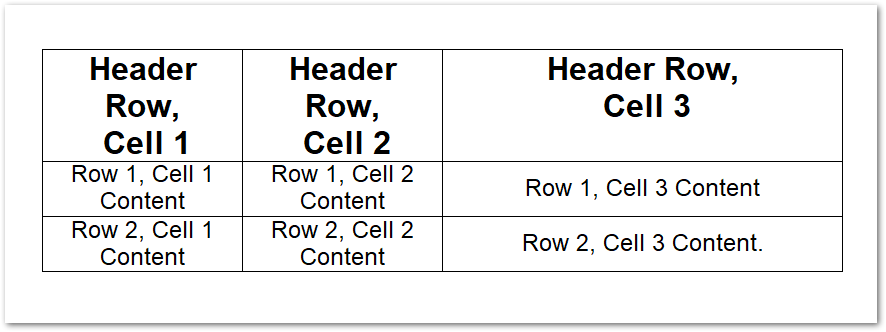
下面是我们使用上述示例代码创建的表格截图。
使用 DOM 创建表格
文档对象模型(DOM)是 Word 文档在内存中的表示形式,可以通过编程方式读取、操作和修改 Word 文档的内容和格式。以下步骤演示了如何使用 DOM 在 Word 文档中创建表格。
• 创建 Document 类对象,加载或创建 Word 文档。
• 创建一个 Table 类对象,并使用 Document.getFirstSection().getBody().appendChild(Table) 方法将表格插入文档。
• 创建一个 Row 类对象,并使用 Table.appendChild(Row) 方法将其插入表格。
• 创建一个 Cell 类对象,设置格式选项并在单元格中添加文本。
• 使用 Row.appendChild(Cell) 方法将单元格插入行中。
• 对任意多行重复此过程。
• 使用 Document.save() 方法保存 Word 文档。
以下代码片段展示了如何用 Java 在 Word 文档中创建表格。
// Create or load document.
Document doc = new Document();
// We start by creating the table object. Note that we must pass the document object
// to the constructor of each node. This is because every node we create must belong
// to some document.
Table table = new Table(doc);
doc.getFirstSection().getBody().appendChild(table);
// Here we could call EnsureMinimum to create the rows and cells for us. This method is used
// to ensure that the specified node is valid. In this case, a valid table should have at least one Row and one cell.
// Instead, we will handle creating the row and table ourselves.
// This would be the best way to do this if we were creating a table inside an algorithm.
Row row = new Row(doc);
row.getRowFormat().setAllowBreakAcrossPages(true);
table.appendChild(row);
// We can now apply any auto fit settings.
table.autoFit(AutoFitBehavior.FIXED_COLUMN_WIDTHS);
Cell cell = new Cell(doc);
cell.getCellFormat().getShading().setBackgroundPatternColor(Color.BLUE);
cell.getCellFormat().setWidth(80.0);
cell.appendChild(new Paragraph(doc));
cell.getFirstParagraph().appendChild(new Run(doc, "Row 1, Cell 1 Text"));
row.appendChild(cell);
// We would then repeat the process for the other cells and rows in the table.
// We can also speed things up by cloning existing cells and rows.
row.appendChild(cell.deepClone(false));
row.getLastCell().appendChild(new Paragraph(doc));
row.getLastCell().getFirstParagraph().appendChild(new Run(doc, "Row 1, Cell 2 Text"));
// Save document.
doc.save("table.docx");
在 Word 文档中插入嵌套表格
还有一种情况是,你需要创建一个嵌套表,它位于父表的单元格内。您无需经历复杂的过程就可以做到这一点。首先,创建一个父表,然后调用 DocumentBuilder.moveTo(Cell.getFirstParagraph()) 方法将控件移动到父表的所需单元格内。完成后,用同样的方法创建一个新表。
以下代码片段展示了如何使用 Java 在 Word 文档中创建嵌套表格。
// Create or load document.
Document doc = new Document();
DocumentBuilder builder = new DocumentBuilder(doc);
// Insert cell.
Cell cell = builder.insertCell();
builder.writeln("Outer Table Cell 1");
builder.insertCell();
builder.writeln("Outer Table Cell 2");
// This call is important to create a nested table within the first table.
// Without this call, the cells inserted below will be appended to the outer table.
builder.endTable();
// Move to the first cell of the outer table.
builder.moveTo(cell.getFirstParagraph());
// Build the inner table.
builder.insertCell();
builder.writeln("Inner Table Cell 1");
builder.insertCell();
builder.writeln("Inner Table Cell 2");
builder.endTable();
// Save document.
doc.save("table.docx");
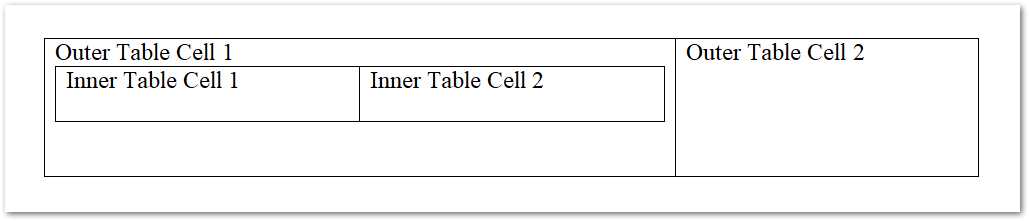
下面是我们创建的嵌套表的截图。
用 Java 从 HTML 创建 Word 表格
您也可以使用 HTML 字符串在 Word 文档中创建表格,以下是需要遵循的步骤。
• 创建一个 Document 类对象,用于加载或创建 Word 文档。
• 创建 DocumentBuilder 类对象。
• 使用 DocumentBuilder.insertHtml(String) 方法将表格的 HTML 字符串插入文档。
• 最后,使用 Document.save() 方法保存文档。
以下是根据 HTML 字符串生成 Word 表格的代码片段。
// Create or load document.
Document doc = new Document();
DocumentBuilder builder = new DocumentBuilder(doc);
// Note that AutoFitSettings does not apply to tables inserted from HTML.
builder.insertHtml("<table>" +
"<tr>" +
"<td>Row 1, Cell 1</td>" +
"<td>Row 1, Cell 2</td>" +
"</tr>" +
"<tr>" +
"<td>Row 2, Cell 2</td>" +
"<td>Row 2, Cell 2</td>" +
"</tr>" +
"</table>");
// Save document.
doc.save("table.docx");
获取免费许可证
您可以获得临时许可证,在没有评估限制的情况下使用 Aspose.Words for Java。
结论
在本文中,我们探讨了如何使用 Java 在 Word 文档中创建表格。您将看到如何使用文档生成器或 DOM 创建表格、创建嵌套表格以及从 HTML 字符串创建表格。通过安装库并遵循指导原则,您可以轻松地将表格创建功能集成到 Java 应用程序中。
Aspose.Words for Java 还提供了许多其他功能和格式选项,让您可以轻松创建丰富而复杂的文档。要了解有关 Aspose.Words for Java 的更多信息,请浏览其丰富的文档和示例。如有任何问题,请随时诉我们。






 渝公网安备50010702505508