


图像裁剪是图像编辑和图形设计应用程序的一项基本功能。通过它,您可以调整图像大小并修剪图像边缘。在 Python 应用程序中处理图像或进行图像编辑时,开发人员往往需要一种轻松的图像裁剪机制。因此,在本文中,我们将学习如何在 Python 应用程序中无缝裁剪图像。
• 裁剪图像的 Python 库 - 免费下载
• 在 Python 中裁剪图像
• 使用移位值裁剪图像
• 使用矩形裁剪图像
裁剪图像的 Python 库
对于图像裁剪,我们将使用 Aspose.Imaging for Python。它是一个多功能库,提供了一系列处理图像的功能。特别是,它能让您轻松执行基本和高级图像编辑任务。
您可以从 PyPI 下载该库或将其安装到您的 Python 应用程序中。
> pip install aspose-imaging-python-net
在 Python 中裁剪图像
使用 Aspose.Imaging for Python 裁剪图像有两种方法:使用移动值和使用矩形。在移动值方法中,我们指定图像移动的左、右、上、下值。另一方面,在第二种方法中,我们使用矩形来定义裁剪区域。
因此,让我们在 Python 代码片段的帮助下,逐一了解上述图像裁剪方法。
用 Python 中的移位值裁剪图像
下面的步骤演示了如何在 Python 中使用移位值裁剪图像。
• 首先,使用 Image.load() 方法将图像加载为光栅图像。
• 然后,缓存图像以提高性能。
• 指定左、右、上、下移动值。
• 将移动值传递给 RasterImage.crop() 方法,然后裁剪图像。
• 最后,使用 RasterImage.save() 方法保存裁剪后的图像。
下面的代码片段展示了如何在 Python 中裁剪图像。
import aspose.pycore as aspycore
from aspose.imaging import RasterImage, Image, Rectangle
import os
if 'TEMPLATE_DIR' in os.environ:
templates_folder = os.environ['TEMPLATE_DIR']
else:
templates_folder = r"C:\Users\USER\Downloads\templates"
delete_output = 'SAVE_OUTPUT' not in os.environ
data_dir = templates_folder
# Load an existing image into an instance of RasterImage class
with aspycore.as_of(Image.load(os.path.join(data_dir, "template.jpg")), RasterImage) as raster_image:
# Before cropping, the image should be cached for better performance
if not raster_image.is_cached:
raster_image.cache_data()
# Define shift values for all four sides
left_shift = 10
right_shift = 10
top_shift = 10
bottom_shift = 10
# Based on the shift values, apply the cropping on image
raster_image.crop(left_shift, right_shift, top_shift, bottom_shift)
# Save croppped image
raster_image.save(os.path.join(data_dir, "result.jpg"))
if delete_output:
os.remove(os.path.join(data_dir, "result.jpg"))
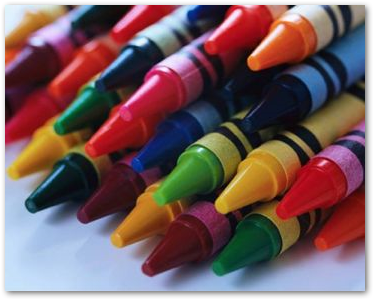
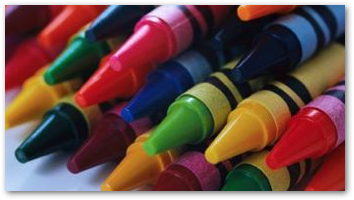
下面是输入图像(第一张)及其裁剪后版本(第二张)的截图。
使用矩形裁剪图像
在这种方法中,我们定义一个矩形来裁剪加载图像中的特定区域。生成的图像包含该矩形内的图像部分。以下是使用矩形裁剪图像的步骤。
• 首先,使用 Image.load() 方法将图像加载为光栅图像。
• 然后,缓存图像。
• 创建所需大小的矩形。
• 将矩形对象传递给 RasterImage.crop() 方法并裁剪图像。
• 最后,使用 RasterImage.save() 方法保存裁剪后的图像。
下面的代码片段展示了在 Python 中使用矩形裁剪图像的过程。
import aspose.pycore as aspycore
from aspose.imaging import RasterImage, Image, Rectangle
import os
if 'TEMPLATE_DIR' in os.environ:
templates_folder = os.environ['TEMPLATE_DIR']
else:
templates_folder = r"C:\Users\USER\Downloads\templates"
delete_output = 'SAVE_OUTPUT' not in os.environ
data_dir = templates_folder
# Load an existing image into an instance of RasterImage class
with aspycore.as_of(Image.load(os.path.join(data_dir, "template.jpg")), RasterImage) as raster_image:
if not raster_image.is_cached:
raster_image.cache_data()
# Create an instance of Rectangle class with desired size
rectangle = Rectangle(20, 20, 20, 20)
# Crop image
raster_image.crop(rectangle)
# Save image
raster_image.save(os.path.join(data_dir, "result.jpg"))
if delete_output:
os.remove(os.path.join(data_dir, "result.jpg"))
获取免费的 Python 图像裁剪库
您可以获得免费的临时许可证,在没有评估限制的情况下裁剪图像。
结论
Aspose.Imaging for Python 为图像裁剪和处理提供了强大的解决方案。本文为您提供了几种图像裁剪方法,您可以轻松将其集成到您的 Python 应用程序中。使用这个强大的 Python 图像编辑 API 增强您的图像处理能力。请访问文档探索它的神奇功能,并联系我们分享您的疑问。





 渝公网安备50010702505508