


OpenOffice 等开源生产力工具有其用途。但如果你想将 ODP 在线转换为 PPT,那么你很可能已经确定微软 PowerPoint 专有的 PPT 格式和平台比 OpenOffice ODP 更适合你的需求。
本文第一部分重点介绍了将 ODP 在线转换为 PPT 的快速方法。第二部分探讨了涉及 C# 应用程序、Java 程序、C++ 平台、Python 项目、Node.js 应用程序和 PHP 项目 API 的转换操作。
将 ODP 在线转换为 PPT
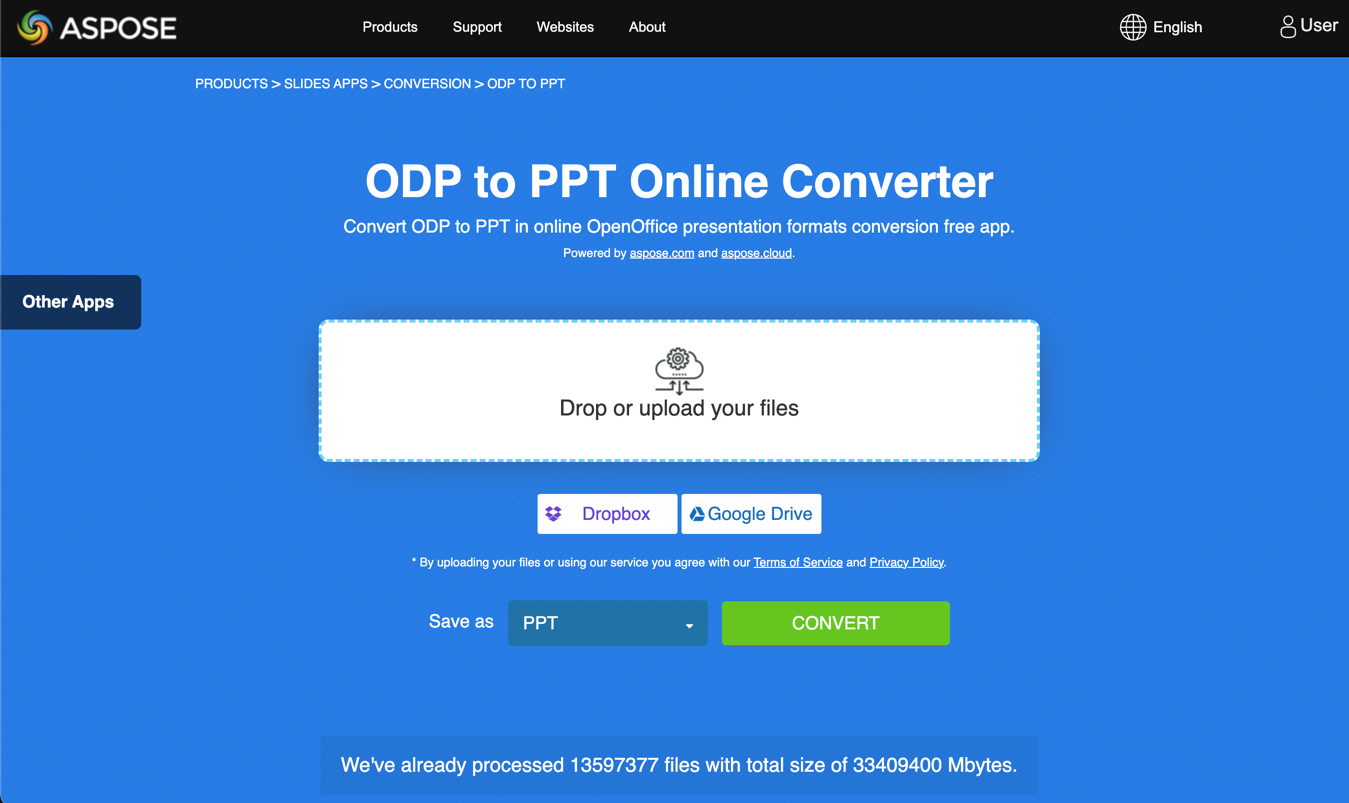
1. 转到 Aspose Online ODP 到 PPT 转换器页面。
2. 单击 "下拉 "或 "上传文件"。
3. 上传要转换为 PPT 的 ODP 演示。
4. 单击 CONVERT(转换)。
常见问题
如何将 ODP 在线转换为 PPT?
首先,在浏览器上打开 ODP 到 PPT 转换器网络应用程序。第二,上传要转换为 PPT 的 ODP 演示文稿。第三,点击 "转换"。就是这样。
ODP 到 PPT 转换器安全吗?
是的,转换器是安全的。所有 Aspose 网络应用程序都使用 HTTPS。更重要的是,所有上传到 Aspose 服务器的转换文件都会在 24 小时内删除。
ODP 转 PPT 转换器能在手机上使用吗?
是的,ODP 转 PPT 转换器可在移动设备上使用。
将 ODP 转换为 PPT 需要多长时间?
如果你要转换为 PPT 的 ODP 演示文稿很小,那么操作应在几秒钟内完成。否则,如果 OpenOffice 文件较大,则可能需要几分钟。
用代码将 ODP 转换为 PPT
Aspose 开发了开发人员在其应用程序中使用的应用程序接口,以执行将 ODP 转换为 PPT 的任务。Aspose.Slides 是一个功能强大的演示 API,它为免费的 ODP 转 PPT 网络应用程序提供了支持。
使用 Aspose.Slides,您可以创建 PowerPoint 和 OpenOffice 演示文稿(从零开始)、将图像导入演示文稿、将演示文稿转换为 PDF 和其他格式等。
• 用 C# 将 ODP 转换为 PPT
• 在 Java 中将 ODP 转换为 PPT
• 用 C++ 将 ODP 导出为 PPT
• 用 Python 将 ODP 保存为 PPT
• 用 Node.js 将 ODP 转换为 PPT
• 在 PHP 中将 ODP 转换为 PPT
• 获取云 API
用 C# 将 ODP 转换为 PPT
1. 按照此处的说明安装 Aspose.Slides for .NET。
2. 使用此 C# 代码将 ODP 转换为 PPT:
// instantiates a Presentation object that represents a ODP file
var presentation = new Presentation("sample.odp");
// saves the presentation as PPT
presentation.Save("output.ppt", SaveFormat.Ppt);
在 Java 中将 ODP 转换为 PPT
1. 点击这里安装 Aspose.Slides for Java。
2. 运行此 Java 代码将 ODP 转换为 PPT:
// instantiates a Presentation object that represents a ODP file
Presentation presentation = new Presentation("sample.odp");
// saves the presentation as PPT
presentation.save("output.ppt", SaveFormat.Ppt);
用 C++ 将 ODP 导出为 PPT
1. 按照安装说明安装 Aspose.Slides for C++。
2. 运行此 C++ 代码,将 ODP 转换为 PPT:
// instantiates a Presentation object that represents a ODP file
SharedPtr<Presentation> prs = MakeObject<Presentation>(u"sourceFile.odp");
// saves the presentation as PPT
prs->Save(u"convertedFile.ppt", Aspose::Slides::Export::SaveFormat::Ppt);
在 Python 中将 ODP 保存为 PPT
1. 按照此处的步骤通过 .NET 安装用于 Python 的 Aspose.Slides。
2. 运行此 Python 代码将 ODP 转换为 PPT:
import aspose.slides as slides
import aspose.pydrawing as drawing
with slides.Presentation("presentation.odp") as presentation:
presentation.save("presentation.ppt", slides.export.SaveFormat.PPT)
在 Node.js 中将 ODP 转换为 PPT
1. 按照安装步骤,通过 Java 安装 Aspose.Slides for Node.js。
2. 运行此 Node.js 代码,将 ODP 转换为 PPT:
var aspose = aspose || {};
aspose.slides = require("aspose.slides.via.java");
var pres = new aspose.slides.Presentation("welcome-to-powerpoint.odp");
try
{
pres.save("output.ppt", aspose.slides.SaveFormat.Ppt);
}
finally
{
if (pres != null) pres.dispose();
}
在 PHP 中将 ODP 转换为 PPT
1. 按照此处的说明通过 Java 安装 Aspose.Slides for PHP。
2. 执行此 PHP 代码,将 ODP 转换为 PPT:
获取云 API
如果您很少使用或根本不使用 Aspose.Slides Web 应用程序和内部 API,那么您可能需要了解一下 Aspose.Slides 云产品。






 渝公网安备50010702505508