



在 Microsoft Visio 中,注释是可以添加到图形、图表或图表中特定区域的注释或注解。这些注释可提供有关图表内容的附加信息、解释或说明。注释是交流与 Visio 图表中元素相关的上下文、细节或反馈的一种方式。Visio 允许用户将注释附加到图形、连接器或图表背景上。在本文中,我们将学习如何在 Python 中为 Visio 图表添加注释。我们还将学习如何使用 Python 编程编辑 VSD 或 VSDX 文件中的现有注释。
本文涵盖以下主题:
• 为 Visio 图表添加注释的 Python API
• 用 Python 在 Visio 图表中添加注释
• 为 Visio 图表中的形状添加注释
• 编辑 Visio 图表中的注释
为 Visio 图表添加注释的 Python API
要在 Visio 图表中添加注释,我们将使用 Aspose.Diagram for Python。它能让开发人员在 Python 应用程序中以编程方式处理 Microsoft Visio 文件。它允许创建新图表、修改现有图表、从图表中提取信息、将图表转换为不同格式等。Aspose.Diagram for Python 简化了使用 Visio 文件时的开发过程,并提供了使用 Python 与这些文件交互的高级 API。
请在控制台中使用以下 pip 命令从 PyPI 下载软件包或安装 API:
pip install aspose-diagram-python
用 Python 在 Visio 图表中添加注释
通过以下步骤,我们可以轻松地为 Visio 图表添加注释:
1. 使用 Diagram 类加载 Visio 图表。
2. 通过索引从页面集合中获取特定页面。
3. 然后,使用 add_comment() 方法插入注释。
4. 最后,使用 save() 方法保存 Visio 图表。该方法将输出 VSDX 文件路径和 SaveFileFormat 作为参数。
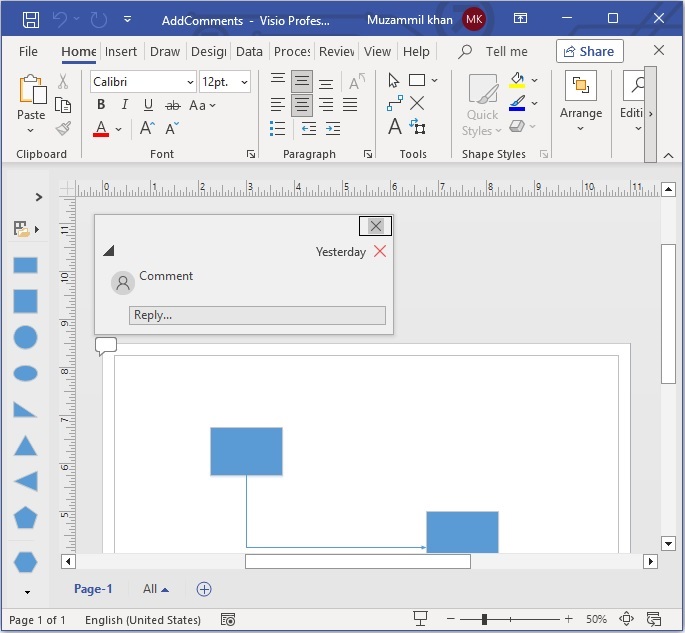
以下代码示例展示了如何在 Python 中为 Visio 图表添加页面级注释。
# This code sample demonstartes how to add page level comments to a Visio diagram in Python.
import aspose.diagram
from aspose.diagram import *
# Load an existing Visio diagram
diagram = Diagram("C:\\Files\Drawing1.vsdx");
# Get page object by index
page0 = diagram.pages[0];
# Add comment to the input visio diagram
diagram.pages[0].add_comment(2.0, 3.0, "Comment");
# Save Visio diagram
diagram.save("C:\\Files\\AddComments.vsdx", SaveFileFormat.VSDX);
使用 Python 为 Visio 图表中的形状添加注释
同样,我们也可以按照以下步骤为 Visio 图表中的特定形状添加注释:
1. 使用 Diagram 类加载 Visio 图表。
2. 通过索引从页面集合中获取特定页面。
3. 从页面的形状集合中按 ID 获取特定形状。
4. 然后,使用 add_comment() 方法插入注释。将形状对象和注释作为参数传递。
5. 最后,使用 save() 方法保存 Visio 图表。该方法将输出 VSDX 文件路径和 SaveFileFormat 作为参数。
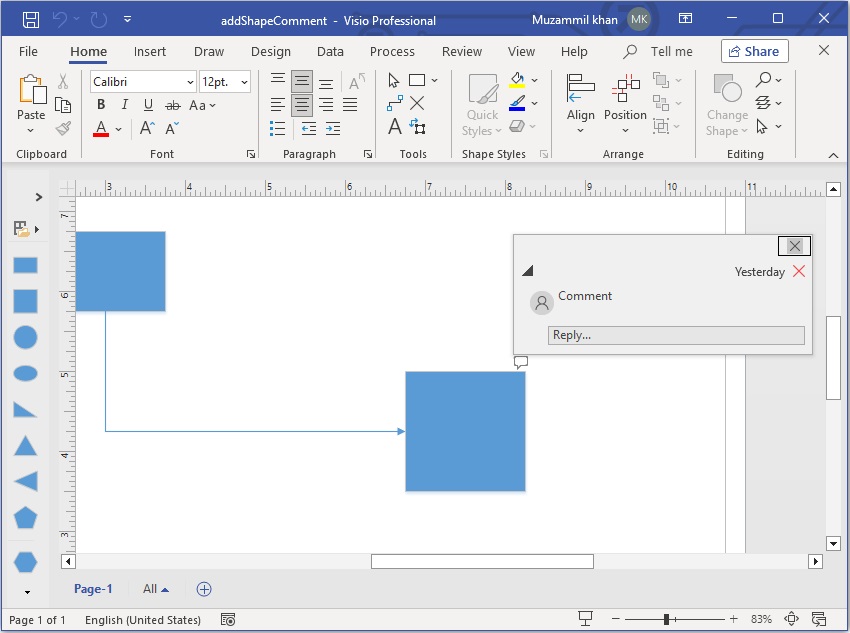
以下代码示例展示了如何使用 Python 在 Visio 图表中为形状添加注释。
# This code sample demonstartes how to add page level comments to a Visio diagram in Python.
import aspose.diagram
from aspose.diagram import *
# Load an existing Visio diagram
diagram = Diagram("C:\\Files\Drawing1.vsdx");
# Get page object by index
page0 = diagram.pages[0];
# Retrieve shape by ID
shape = page0.shapes.get_shape(1);
# Add comment to the shape
page0.add_comment(shape, "Comment");
# Save Visio diagram
diagram.save("C:\\Files\\addShapeComment.vsdx", SaveFileFormat.VSDX);
使用 Python 编辑 Visio 图表中的注释
我们还可以按照以下步骤编辑 Visio 图表中的任何注释:
1. 使用 Diagram 类加载 Visio 图表。
2. 通过索引从页面集合中获取特定页面。
3. 遍历注释集合。
4. 然后,读取并更新 comment.value 属性。
5. 最后,使用 save() 方法保存 Visio 图表。该方法将输出 VSDX 文件路径和 SaveFileFormat 作为参数。
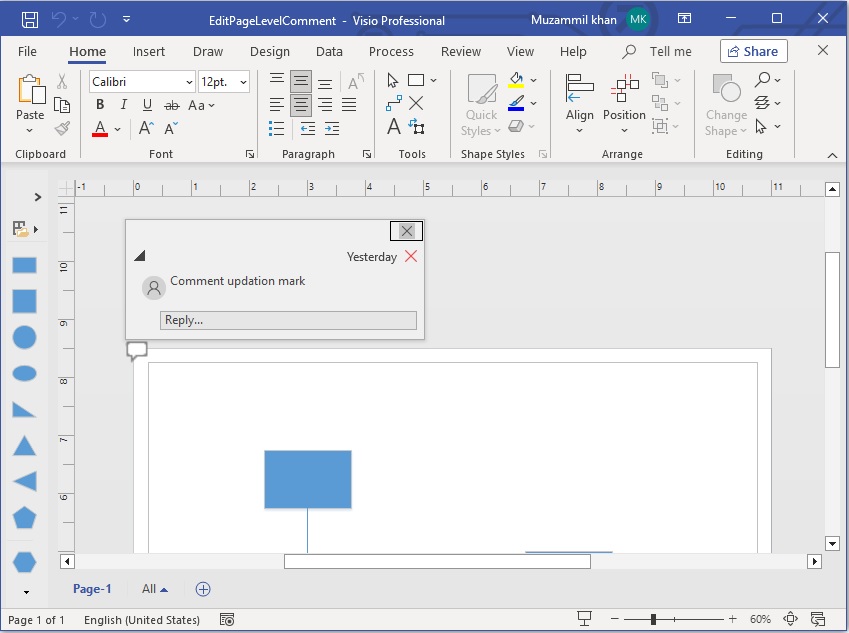
以下代码示例展示了如何使用 Python 编辑 Visio 图表中的注释。
# This code sample demonstartes how to add page level comments to a Visio diagram in Python.
import aspose.diagram
from aspose.diagram import *
# Load an existing Visio diagram
diagram = Diagram("C:\\Files\Drawing1.vsdx");
# Get page object by index
page0 = diagram.pages[0];
# Get collection of the annotations
annotations = page0.page_sheet.annotations;
# Iterate through the annotations
for annotation in annotations:
comment = annotation.comment.value;
print(comment)
comment += " updation mark";
annotation.comment.value = comment;
print(annotation.comment.value)
# Save Visio diagram
diagram.save("C:\\Files\\EditPageLevelComment.vsdx", SaveFileFormat.VSDX);
获取免费 API 许可证
获取免费临时许可证,免费体验程序库的功能。使用免费的临时许可证,您可以不受任何限制地探索程序库的功能。
结论
在本文中,我们学习了如何用 Python 为 Visio 图表添加注释。通过利用 Aspose.Diagram for Python,开发人员可以使用 Python 以编程方式自动完成 Visio 图表注释过程。如果有任何不清楚的地方,请联系我们。





 渝公网安备50010702505508