


在文本编辑领域,一个能删除不必要空格的高效宏是必不可少的。它可以提高工作效率,简化工作流程。在本文中,我们将指导您创建一个 ONLYOFFICE 宏,用于删除所选文本中多余的空格。

构建宏
我们首先访问活动文档并捕获所选内容:
const oDocument = Api.GetDocument();
const oRange = oDocument.GetRangeBySelect();
const rawText = oRange.GetText();
然后删除选中的文本。稍后,它将被格式化后的文本取代,不会有任何多余的空格:
oRange.Delete();
我们根据换行符将原始文本分割成一个段落数组。段落数组的每个元素代表原始文本中的一个段落:
// Split the original word into an array of paragraphs based on newline characters
const paragraphs = rawText.split('\n');
然后,循环遍历段落数组中的每个段落,用单个空格替换连续的空白,对其进行清理。清理后的段落存储在 cleanedParagraphs 数组中:
const cleanedParagraphs = [];
// Clean each paragraph and store it in the cleanedParagraphs array
for (const paragraph of paragraphs) {
// Use a regular expression to replace consecutive whitespaces with a single space
const cleanedParagraph = paragraph.replace(/\s+/g, ' ');
cleanedParagraphs.push(cleanedParagraph);
}
清理完每个段落后,我们使用 join('\n') 方法将清理过的段落合并为一个字符串,其中每个清理过的段落之间用换行符 (\n)隔开。这一步至关重要,因为在文档中插入文本时,我们需要提供一个带有适当段落分隔符的单一字符串:
// Join the cleaned paragraphs back together with newline characters
const cleanedText = cleanedParagraphs.join('\n');
最后,我们创建一个新段落(oParagraph),并将 cleanedText 插入文档。这个 cleanedText 包含所有已清理的段落,它们被合并成一个字符串,并使用换行符来保留原来的段落结构:
// Insert the cleanedText with original paragraph structure
const oParagraph = Api.CreateParagraph();
oParagraph.AddText(cleanedText);
oDocument.InsertContent([oParagraph], { "KeepTextOnly": true });
整个宏代码如下:
(function()
{
const oDocument = Api.GetDocument();
const oRange = oDocument.GetRangeBySelect();
const rawText = oRange.GetText();
oRange.Delete();
// Split the original word into an array of paragraphs based on newline characters
const paragraphs = rawText.split('\n');
// Create an array to store cleaned paragraphs
const cleanedParagraphs = [];
// Clean each paragraph and store it in the cleanedParagraphs array
for (const paragraph of paragraphs) {
// Use a regular expression to replace consecutive whitespaces with a single space
const cleanedParagraph = paragraph.replace(/\s+/g, ' ');
cleanedParagraphs.push(cleanedParagraph);
}
// Join the cleaned paragraphs back together with newline characters
const cleanedText = cleanedParagraphs.join('\n');
// Insert the cleanedText with original paragraph structure
const oParagraph = Api.CreateParagraph();
oParagraph.AddText(cleanedText);
oDocument.InsertContent([oParagraph], { "KeepTextOnly": true });
})();
让我们运行宏,看看它是如何工作的!
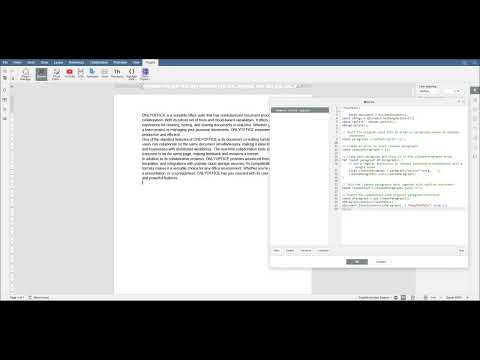
我们希望这个宏将成为您工具包中的宝贵资产,将您的工作效率提升到新的高度。使用 ONLYOFFICE 宏,您可以释放提高生产力的潜力,获得高效和自动化的解决方案。
在冒险创建宏的同时,不要忽视ONLYOFFICE API提供的可能性。如果您有任何疑问或创新想法,请随时通过评论或联系我们与我们分享。我们重视您的意见,并对合作潜力感到兴奋!祝您在探索中取得成功!


 渝公网安备50010702505508