



在本文中,我们将学习如何用 C# 更改 HTML 边框颜色。本指南将为您提供使用 C# 编程有效更改 HTML 文件中的边框颜色、边框颜色 CSS、HTML 表格边框颜色等所需的知识和技能。
本文涵盖以下主题:
在 HTML 文件中更改边框颜色的 C# API
更改 HTML 边框颜色
使用内部 CSS 更改 CSS 边框颜色
更改 HTML 表格边框颜色
更改 HTML 文件边框颜色的 C# API
我们将使用 Aspose.HTML for .NET 来更改 HTML 文件中的边框颜色。Aspose.HTML for .NET是一个功能强大、用途广泛的跨平台类库,可帮助开发人员在其.NET应用程序中操作和管理HTML文档。它允许您创建、编辑和转换 HTML 文件。Aspose.HTML for .NET 可让您分析和提取 HTML 文件中的内容。它不仅支持 HTML5,还支持 CSS3 和 HTML Canvas 规范,让您可以对 HTML 文档进行样式设置并与动态元素进行交互。
请下载 API 的 DLL 或使用 NuGet 安装。
PM> Install-Package Aspose.Html
在 C# 中更改 HTML 边框颜色
border-color 属性可设置元素所有四个边框的颜色。如果为 border-color 属性指定了一个值,所有边框都将涂上该颜色。例如,如果我们将 border-color 属性设置为红色,那么所有四个边框的颜色都将是红色。此外,我们还可以灵活地为顶部、右侧、底部和左侧边框指定不同的颜色值。
我们可以按照以下步骤更改任何 HTML 元素的边框颜色:
使用 HTMLDocument 类加载现有的 HTML 文件。
获取要更改边框颜色的特定 HTMLElement。
设置边框样式属性,如 BorderStyle、BorderColor。
最后,将 HTML 文档保存到文件中。
以下代码示例展示了如何使用 C# 在 HTML 中更改边框颜色。
// Prepare path to source HTML file
string documentPath = "C:\\Files\\input.html";
// Prepare output path for document saving
string savePath = "C:\\Files\\output.html";
// Create an instance of an HTML document
var document = new HTMLDocument(documentPath);
// Find the h1 element to set a style attribute
var header = (HTMLElement)document.GetElementsByTagName("h1").First();
// Set style attribute properties
header.Style.BorderStyle = "solid";
header.Style.BorderColor = "red blue green gray";
// Find the h2 element to set a style attribute
var subheading = (HTMLElement)document.GetElementsByTagName("h2").First();
// Set style attribute properties
subheading.Style.BorderStyle = "solid";
subheading.Style.BorderColor = "black";
// Save the HTML document to a file
document.Save(Path.Combine(savePath));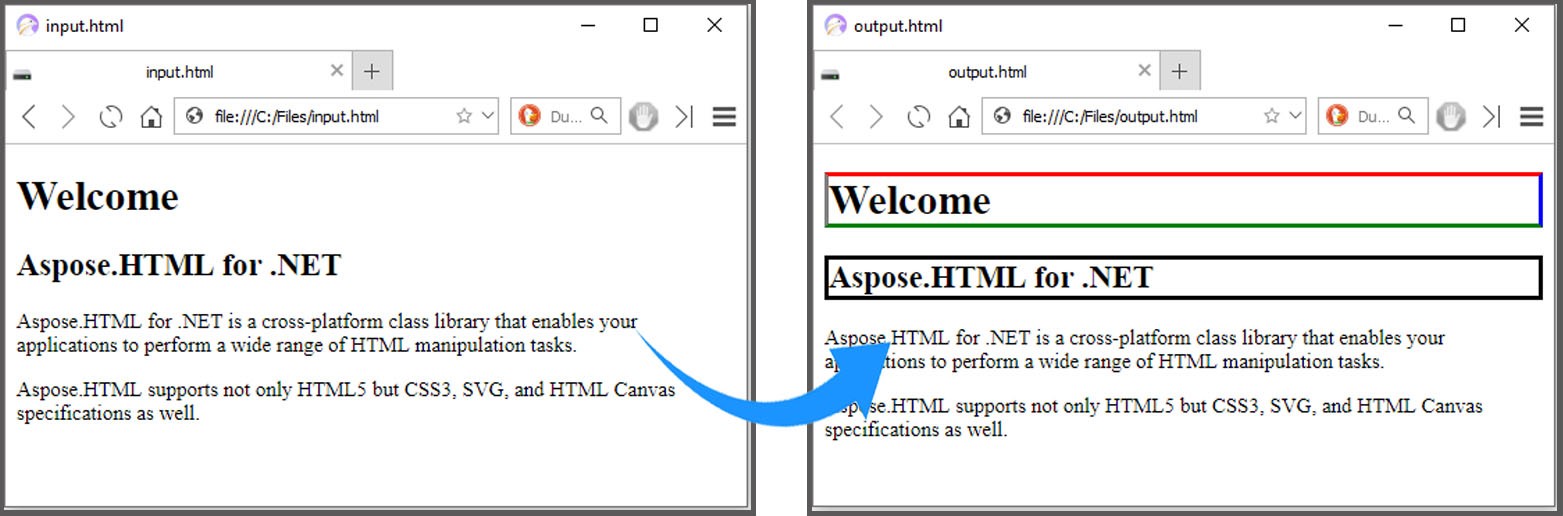
使用 C# 中的内部 CSS 更改边框颜色 CSS
我们可以通过在 HTML 文档中使用 <style> 元素添加内部 CSS 来更改边框颜色,具体步骤如下:
使用 HTMLDocument 类加载现有的 HTML 文件。
使用 CreateElement() 方法创建 <style> 元素。
为 <style> 元素指定 TextContent。
获取要更改边框颜色的特定 HTMLElement。
然后,使用 AppendChild() 方法追加样式元素。
最后,将 HTML 文档保存到文件中。
以下代码示例展示了如何在 C# 中使用内部 CSS 更改边框颜色。
// Prepare path to source HTML file
string documentPath = "C:\\Files\\input.html";
// Prepare output path for document saving
string savePath = "C:\\Files\\output_css.html";
// Create an instance of an HTML document
var document = new HTMLDocument(documentPath);
// Create a style element and assign the color border-style and border-color values for h1 element
var style = document.CreateElement("style");
style.TextContent = "h1 { color:Blue; border-style:solid; border-color:rgb(220,30,100) }";
// Find the document head element and append style element to the head
var head = document.GetElementsByTagName("head").First();
head.AppendChild(style);
// Save the HTML document to a file
document.Save(Path.Combine(savePath));
上述示例代码在输出 HTML 文档的 <head> 部分添加了以下 <style> 元素。
<style>
h1 {
color: blue;
border-top-style: solid;
border-right-style: solid;
border-bottom-style: solid;
border-left-style: solid;
border-top-color: rgb(220, 30, 100);
border-right-color: rgb(220, 30, 100);
border-bottom-color: rgb(220, 30, 100);
border-left-color: rgb(220, 30, 100); }
</style>
用 C# 更改 HTML 表格边框颜色
我们可以使用内部 CSS 或内联 CSS 轻松更改 HTML 表格的边框颜色。我们可以将 <style> 元素应用于 HTML <table> 元素。
请按照以下步骤更改 HTML 表格的边框颜色。
使用 HTMLDocument 类加载现有的 HTML 文件。
使用 QuerySelector() 方法选择表格。
使用 SetAttribute() 方法设置样式属性。
最后,将 HTML 文档保存到文件中。
以下代码示例展示了如何使用 C# 更改 HTML 表格的边框颜色。
// Prepare path to source HTML file
string documentPath = "C:\\Files\\html_table.html";
// Prepare output path for document saving
string savePath = "C:\\Files\\output_table.html";
// Create an instance of an HTML document
var document = new HTMLDocument(documentPath);
// Create a CSS Selector that selects the first table element
var element = document.QuerySelector("table");
// Set style attribute with properties for the selected element
element.SetAttribute("style", "border: 2px #0000ff solid");
// Save the HTML document to a file
document.Save(savePath);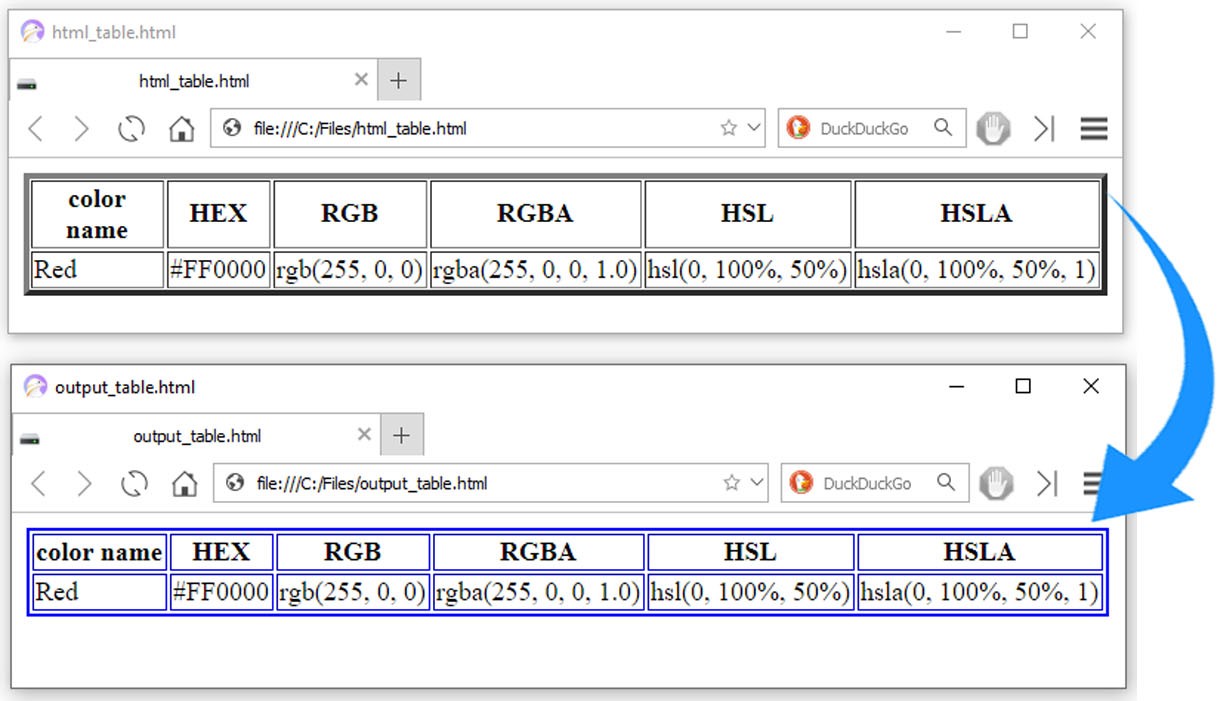
获取免费许可证
您可以免费获得临时许可证,试用 Aspose.HTML for .NET,不受评估限制。
结论
在本文中,我们学习了如何使用 C# 更改 HTML 文档中的边框颜色。我们探索了改变不同 HTML 元素边框颜色的各种方法。按照本文提供的步骤和代码示例,您可以轻松开发出自己的定制解决方案,用于处理 HTML 文档。如果有任何不清楚的地方,请随时与我们联系。





 渝公网安备50010702505508