



HTML 表格在网页上以网格格式显示数据。表格以行和列的形式组织表格数据,每个单元格可包含文本、图像、链接或其他 HTML 元素。在本文中,我们将学习如何用 Java 创建 HTML 表格。
本文涵盖以下主题:
创建 HTML 表格的 Java API
创建 HTML 表格
创建带样式属性的 HTML 表格
使用 rowspan 和 colspan 创建 HTML 表格
在线 HTML 表格生成器
创建 HTML 表格的 Java API
我们将使用 Aspose.HTML for Java 以编程方式创建 HTML 表格。它使开发人员能够在 Java 应用程序中处理 HTML 文档。它允许进行 HTML 解析、渲染、编辑以及将 HTML 文档转换为其他支持的格式。
请下载 API 的 JAR 或在基于 Maven 的 Java 应用程序中添加以下 pom.xml 配置。
 <repositories>
     <repository>
         <id>snapshots</id>
         <name>repo</name>
         <url>http://repository.aspose.com/repo/</url>
     </repository>
</repositories>
 <dependencies>
    <dependency>
        <groupId>com.aspose</groupId>
        <artifactId>aspose-html</artifactId>
        <version>23.11</version>
        <classifier>jdk17</classifier>
    </dependency>
</dependencies>
在 Java 中创建 HTML 表格
HTML 表格是通过 <table> 元素定义的,其结构是通过其他各种元素进一步指定的,如用于行的 <tr>、用于标题单元格的 <th> 和用于数据单元格的 <td>。
我们可以按照以下步骤轻松创建 HTML 表格:
创建 HTMLDocument 类的实例。
可选择创建样式元素并将其附加到 head 元素。
使用 createElement() 方法创建 <table>、<tbody>、<tr>、<th> 和 <td> 元素。
使用 appendChild() 方法将子元素追加到父元素。
然后,将 <table> 元素追加到 <body> 元素。
最后,调用 save() 方法将文档保存在给定的文件路径下。
以下代码示例展示了如何用 Java 创建 HTML 表格。
// Prepare a path for edited file saving
String savePath = "C:\\Files\\Table.html";
// Initialize an empty HTML document
HTMLDocument document = new HTMLDocument();
// Create a style element and assign the color border-style and border-color values for table element
Element style = document.createElement("style");
style.setTextContent("table, th, td { border: 1px solid #0000ff; }");
// Find the document head element and append style element to the head
Element head = document.getElementsByTagName("head").get_Item(0);
head.appendChild(style);
// Declare a variable body that references the <body> element
Element body = document.getBody();
// Specify cols and rows
int cols = 3;
int rows = 2;
boolean isFirstRowHeader = false;
// Create table element
Element table = document.createElement("table");
// Create a table body
Element tbody = document.createElement("tbody");
table.appendChild(tbody);
// Create a table header row
if (isFirstRowHeader)
{
    Element tr = document.createElement("tr");
    tbody.appendChild(tr);
    // Create table header columns
    for (int j = 1; j < cols + 1; j++)
    {
        Element th = document.createElement("th");
        Text title = document.createTextNode("Column-" + j);
        th.appendChild(title);
        tr.appendChild(th);
    }
    for (int i = 0; i < rows - 1; i++)
    {
        // Create a table row
        Element dataTr = document.createElement("tr");
        tbody.appendChild(dataTr);
        // Create table header cells
        for (int j = 1; j < cols + 1; j++)
        {
            Element td = document.createElement("td");
            Text title = document.createTextNode("Data-" + j);
            td.appendChild(title);
            dataTr.appendChild(td);
        }
    }
}
else
{
    for (int i = 0; i < rows; i++)
    {
        // Create a table row
        Element dataTr = document.createElement("tr");
        tbody.appendChild(dataTr);
        // Create table cells
        for (int j = 1; j < cols + 1; j++)
        {
            Element td = document.createElement("td");
            Text title = document.createTextNode("Data-" + j);
            td.appendChild(title);
            dataTr.appendChild(td);
        }
    }
}
// Append table to body
body.appendChild(table);
// Save the document to a file
document.save(savePath);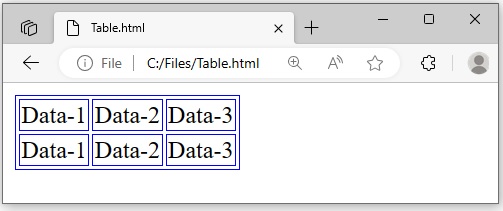
用 Java 创建带样式属性的 HTML 表格
我们可以使用 SetAttribute(string name, string value) 方法为 HTML 元素指定 <style> 属性。我们将按照前面提到的步骤创建 HTML 表格。但是,我们需要使用 SetAttribute(string name, string value) 方法设置 <style> 属性。该方法会为元素添加一个新属性,如果属性名已经存在,则会更新属性值。我们可以为 <table>、<tbody>、<tr>、<th> 和 <td> 元素设置属性。
以下代码示例展示了如何用 Java 创建带有样式属性的 HTML 表格。
// Prepare a path for edited file saving
String savePath = "C:\\Files\\TableWithStyle.html";
// Initialize an empty HTML document
HTMLDocument document = new HTMLDocument();
// Create a style element and assign the color border-style and border-color values for table element
Element style = document.createElement("style");
style.setTextContent("table, th, td { border: 1px solid #0000ff; border-collapse: collapse;}");
// Find the document head element and append style element to the head
Element head = document.getElementsByTagName("head").get_Item(0);
head.appendChild(style);
// Declare a variable body that references the <body> element
Element body = document.getBody();
// Create table element
Element table = document.createElement("table");
table.setAttribute("style", "background-color:#00FF00;");
// Create table body
Element tbody = document.createElement("tbody");
table.appendChild(tbody);
// Create table header row
Element tr = document.createElement("tr");
tbody.appendChild(tr);
// Set style attribute with properties for the selected element
tr.setAttribute("style", "border: 2px Black solid; background-color:Red; color:#FFFFFF");
// Create table header cell 1
Element th = document.createElement("th");
Text title = document.createTextNode("Name");
th.appendChild(title);
tr.appendChild(th);
// Create table header cell 2
th = document.createElement("th");
title = document.createTextNode("Email");
th.appendChild(title);
tr.appendChild(th);
// Create table header cell 3
th = document.createElement("th");
title = document.createTextNode("Phone");
th.appendChild(title);
tr.appendChild(th);
// Create table data row
Element dataTr = document.createElement("tr");
tbody.appendChild(dataTr);
// Create table data cell 1
Element td = document.createElement("td");
Text data = document.createTextNode("John Doe");
td.appendChild(data);
dataTr.appendChild(td);
// Create table data cell 2
td = document.createElement("td");
data = document.createTextNode("john.doe@example.com");
td.appendChild(data);
dataTr.appendChild(td);
// Create table data cell 3
td = document.createElement("td");
data = document.createTextNode("123-456-789");
td.appendChild(data);
dataTr.appendChild(td);
// Append table to body
body.appendChild(table);
// Save the document to a file
document.save(savePath);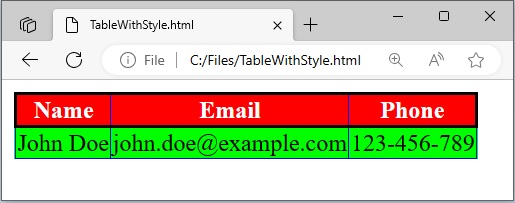
在 Java 中使用 Rowspan 和 Colspan 创建 HTML 表格
<colspan> 和 <rowspan> 是 HTML 中的属性,用于在 <td> 和 <th> 元素中控制 HTML 表格中单元格跨多列或多行的跨度。我们可以使用 SetAttribute(string name, string value) 方法为表格单元格设置 <colspan> 和 <rowspan> 属性,如下所示:
// Prepare a path for edited file saving
String savePath = "C:\\Files\\ColSpanRowSpan.html";
// Initialize an empty HTML document
HTMLDocument document = new HTMLDocument();
// Create a style element and assign the color border-style and border-color values for table element
Element style = document.createElement("style");
style.setTextContent("table, th, td { border: 1px solid #0000ff; border-collapse: collapse;}");
// Find the document head element and append style element to the head
Element head = document.getElementsByTagName("head").get_Item(0);
head.appendChild(style);
// Declare a variable body that references the <body> element
Element body = document.getBody();
// Create table element
Element table = document.createElement("table");
// Create table body
Element tbody = document.createElement("tbody");
table.appendChild(tbody);
// Create table header row
Element tr = document.createElement("tr");
tbody.appendChild(tr);
// Create table header cell 1
Element th = document.createElement("th");
Text title = document.createTextNode("Person Details");
th.appendChild(title);
tr.appendChild(th);
// Specify Colspan
th.setAttribute("colspan", "2");
// Create table data row
Element dataTr = document.createElement("tr");
tbody.appendChild(dataTr);
// Create table header cell 1
th = document.createElement("th");
title = document.createTextNode("Name");
th.appendChild(title);
dataTr.appendChild(th);
// Create table data cell 2
Element td = document.createElement("td");
Text data = document.createTextNode("John Doe");
td.appendChild(data);
dataTr.appendChild(td);
// Create table data row
dataTr = document.createElement("tr");
tbody.appendChild(dataTr);
// Create table header cell
th = document.createElement("th");
title = document.createTextNode("Phone");
th.appendChild(title);
dataTr.appendChild(th);
// Specify Colspan
th.setAttribute("rowspan", "2");
// Create table data cell
td = document.createElement("td");
data = document.createTextNode("123-456-780");
td.appendChild(data);
dataTr.appendChild(td);
// Create table data row
dataTr = document.createElement("tr");
tbody.appendChild(dataTr);
// Create table data cell
td = document.createElement("td");
data = document.createTextNode("123-456-789");
td.appendChild(data);
dataTr.appendChild(td);
// Append table to body
body.appendChild(table);
// Save the document to a file
document.save(savePath);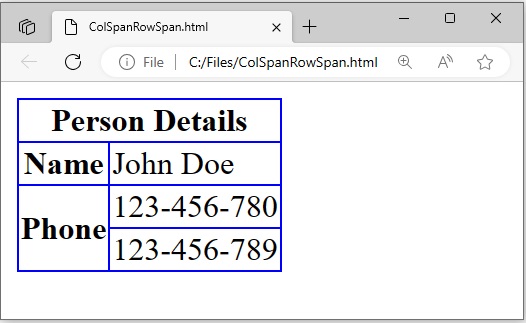
获取免费许可证
请获取免费的临时许可证,试用 Aspose.HTML for Java,不受评估限制。
在线 HTML 表格生成器
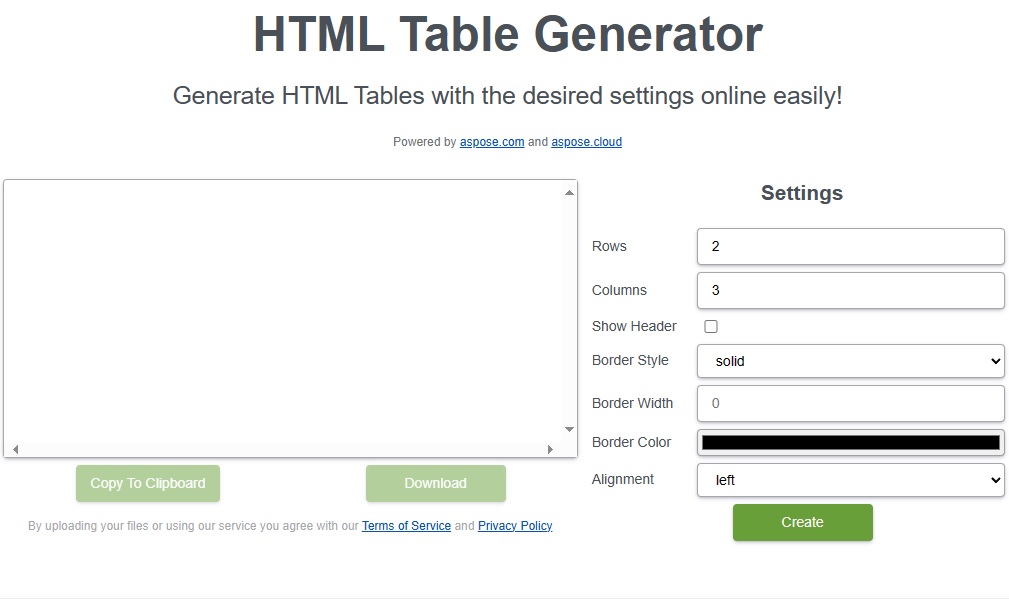
您还可以使用使用此 API 开发的免费 HTML 表格生成器网络应用程序在线创建 HTML 表格。
结论
在本文中,我们学习了如何用 Java 创建 HTML 表格。按照本文概述的步骤,您可以轻松开发出自己的定制解决方案来处理 HTML 表格。如果有任何不清楚的地方,请随时与我们联系。





 渝公网安备50010702505508