


Aspose.Slides for Node.js 通过 Java 提供了以编程方式将多个 PowerPoint 合并为一个的方法和属性。该 PowerPoint JavaScript API 可让您自动合并 PowerPoint 文件,从而将当前和以前的数据放到一处。然而,MS PowerPoint 是一种用于紧凑呈现业务数据的强大工具。本指南将探讨如何在基于 Node.js 的项目中安装 Aspose PPT 合并库。此外,我们还将介绍如何在 Node.js 中合并多个 PowerPoint。
本文将介绍以下几点:
PowerPoint JavaScript API 安装
在 Node.js 中合并多个 PowerPoint
在线合并 PPTX
PowerPoint JavaScript API 安装
本安装指南包含 Windows、macOS 和 Linux 的安装程序。事实上,安装 Aspose PPT 合并程序非常简单。您可以利用它的大量功能来满足您的软件需求。首先,您可以从 NPM 下载软件包,或者在终端/CMD 中运行以下命令进行安装:
npm install aspose.slides.via.java
在 Node.js 中合并多个 PowerPoint
现在,我们将调用 Aspose PPT 合并库提供的函数。为此,我们的文件系统中有两个不同的 PPTX/PPT 源文件。
您可以按照以下步骤自动合并 PowerPoint 文件:
在应用程序中获取 aspose.slides.via.java 模块。
使用源文件的文件格式初始化 LoadOptions 类的实例。
实例化一个 Presentation 类对象,并用第一个 PPTX 文件和一个 LoadOptions 类对象对其进行初始化。
加载第二个源 PPTX 文件。
循环浏览 getSlides 方法返回的幻灯片。
调用 addClone 方法将指定幻灯片的副本添加到集合的末尾。
调用 save 方法将合并后的 PowerPoint 文件保存到磁盘上。
以下代码片段演示了如何通过编程将多个 PowerPoint 合并为一个:
// Combine Multiple PowerPoints in Node.js
var aspose = aspose || {};
// Obtain the aspose.slides.via.java module in your app.
aspose.slides = require("aspose.slides.via.java");
// Initialize an instance of the LoadOptions class with the fileformat of the source document.
var loadOptions = new aspose.slides.LoadOptions(0);
// Instantiate an object of the Presentation class and initialize it with first PPTX file and an object of the LoadOptions class.
var pres1 = new aspose.slides.Presentation("first_ppt.pptx", loadOptions);
// Load the second PPTX file
var loadOptions2 = new aspose.slides.LoadOptions(0);
var pres2 = new aspose.slides.Presentation("second_ppt.pptx",loadOptions2);
try
{
// Loop through the slides returned by the getSlides method.
    for (var i = 0; i < pres2.getSlides().size(); i++)
    {
// Call addClone method to add a copy of a specified slide to the end of the collection.
        pres1.getSlides().addClone(pres2.getSlides().get_Item(i));
    }
// Invoke the save method to save the merged PowerPoint file on the disk.
    pres1.save("combinedPresentation.pptx", aspose.slides.SaveFormat.Pptx);
  console.log("combined multiple PowerPoints successfully");
}
finally
{
    if (pres1 != null) pres1.dispose();
    if (pres2 != null) pres2.dispose();
}
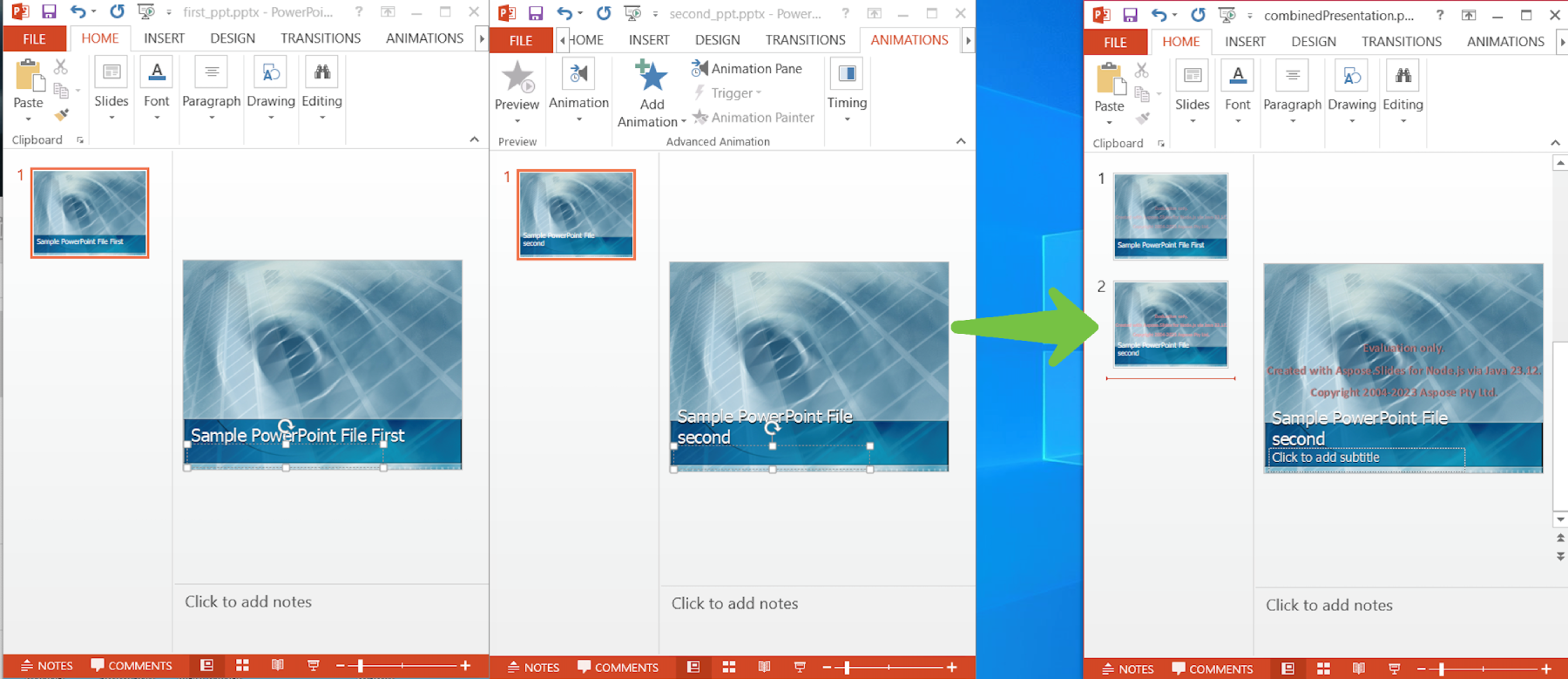
运行上述代码示例后,一个新的 PPTX 文件(即 combinedPresentation.pptx)将在指定地址创建。您可以在下图中看到输出结果:
在线合并 PPTX
Aspose.Slides for Node.js via Java 不仅提供编程解决方案,还提供在线合并 PPTX/PPT 文件的在线工具。使用这款企业级在线 Aspose PPT 合并工具,您可以自动合并 PowerPoint 文件。该工具的最大优点是免费,而且几乎可以在所有流行的网络浏览器中使用。

将多个 PowerPoint 合并为一个 - 获取免费许可证
您可以利用免费的临时许可证试用此 PowerPoint JavaScript API,不受评估限制。
结束语
本文到此结束。非常感谢您的关注,希望您已学会如何在 Node.js 中以编程方式合并多个 PowerPoint。此外,我们还介绍了一种在线 PPTX 合并器,您可以使用它来自动合并 PowerPoint 文件。此外,请访问 PowerPoint JavaScript API 的文档。API 引用将让您通过 Java 直接访问 Aspose.Slides for Node.js 的类和方法。
常见问题 - FAQ
如何将多个 PowerPoint 合成一个?
您可以使用 Aspose.Slides for Node.js 通过 Java 将多个 PowerPoint 组合在一起。
如何合并多个 PPTX 文件?
该在线工具用于在线合并 PPTX。它拥有用户友好的用户界面,可以轻松上传和处理文件。






 渝公网安备50010702505508