


OneNote 是记笔记、整理信息和与他人协作的强大工具。在 OneNote 中更改文本样式的一个常见用例是在笔记中突出重点或标题。通过改变某些文本的字体大小、颜色或样式,我们可以使其脱颖而出,引起人们对重要信息的关注。在本文中,我们将学习如何使用 C# 在 OneNote 中以编程方式更改文本样式。
本文涵盖以下主题:
更改文本样式的 C# OneNote API
使用文本样式创建页面标题
更改页面标题的文本样式
更改段落的文本样式
设置默认段落样式
更改文本样式的 C# OneNote API
要使用 C# 更改 OneNote 中的文本样式,我们将使用 Aspose.Note for .NET API。它允许在 .NET 应用程序中以编程方式创建、修改和转换 OneNote 文档。
请下载该 API 的 DLL 或使用 NuGet 安装。
PM> Install-Package Aspose.Note
用 C# 创建带文本样式的 OneNote 页面标题
我们可以通过以下步骤在 OneNote 文档中创建页面标题:
使用 Document 类创建一个新的 OneNote 文档。
使用 Page 类添加新页面。
使用 Title 类创建标题。
使用 RichText 类指定标题文本、日期和时间。
设置 RichText 类对象的 ParagraphStyle 属性,以定义其字体名称、大小、颜色等。
最后,使用 Save 方法保存文档。
以下代码示例展示了如何使用 C# 在 OneNote 文档中创建带样式的页面标题。
// Create a new document
var document = new Document();
// Add a new page
var page = new Page();
// Create a page title
page.Title = new Title()
{
    TitleText = new RichText()
    {
        Text = "Title text.",
        ParagraphStyle = new ParagraphStyle()
        {
            FontName = "Courier New",
            FontSize = 20
        }
    },
    TitleDate = new RichText()
    {
        Text = new DateTime(2011, 11, 11).ToString("D", CultureInfo.InvariantCulture),
        ParagraphStyle = ParagraphStyle.Default
    },
    TitleTime = new RichText()
    {
        Text = "12:34",
        ParagraphStyle = ParagraphStyle.Default
    }
};
// Append the page to the document
document.AppendChildLast(page);
// Save the document
document.Save("D:\\Files\\CreatePageTitle.one");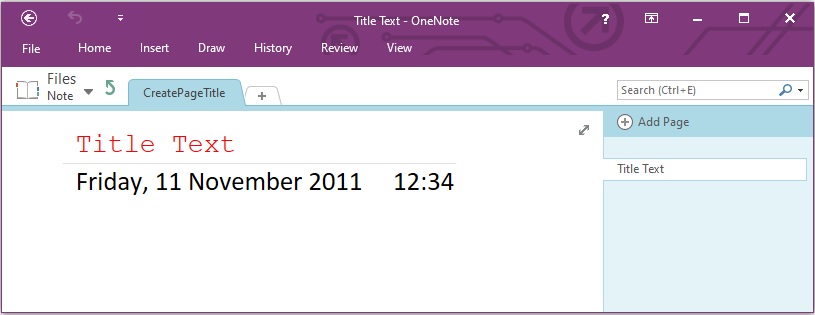
用 C# 更改页面标题的文本样式
我们可以通过以下步骤更改 OneNote 文档中页面标题的文本样式:
使用文档类加载现有的 OneNote 文档。
循环浏览文档中的所有页面标题。
修改每个标题的 ParagraphStyle 属性。
或者,为每个标题修改 TextRuns 的样式属性。
最后,使用 Save 方法保存文档。
以下代码示例展示了如何使用 C# 更改 OneNote 文档中页面标题的文本样式。
// Load the document into Aspose.Note.
Document document = new Document("D:\\Files\\Aspose.one");
// Change the style
foreach (var title in document.Select(e => e.Title.TitleText))
{
    // Modify title paragraph style
    title.ParagraphStyle.FontSize = 38;
    title.ParagraphStyle.IsBold = true;
    // Alternativly modify text run style within the title
    foreach (var run in title.TextRuns)
    {
        run.Style.FontSize = 50;
        run.Style.IsBold = true;
    }
}
// Save the document
document.Save("D:\\Files\\PageTitle.one");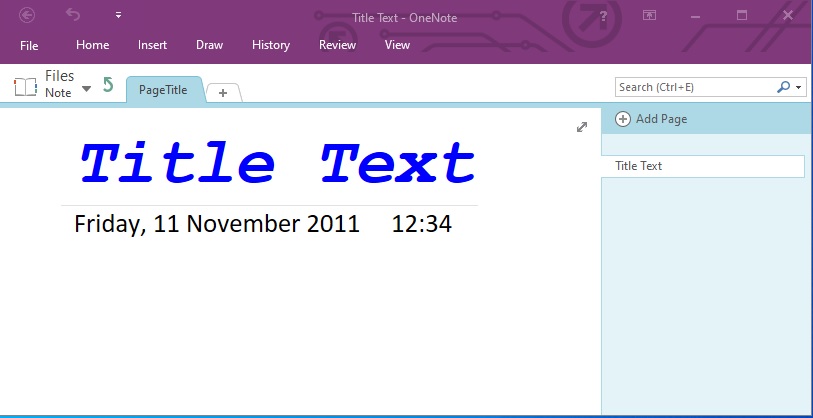
用 C# 更改 OneNote 段落的文本样式
我们可以通过以下步骤更改 OneNote 文档中段落的文本样式:
使用 Document 类加载 OneNote 文档。
使用 GetChildNodes() 方法获取特定或所有 RichText 节点。
修改 RichText 节点的样式属性,如 TextRuns 的 FontColor、Highlight、FontSize 等。
最后,使用 Save 方法保存文档。
以下代码示例展示了如何使用 C# 更改 OneNote 文档中段落的文本样式。
// Load the document into Aspose.Note.
Document document = new Document("D:\\Files\\Aspose.one");
// Get all the pages
var pages = document.GetChildNodes<Page>();
// Get a particular RichText node(s)
IList<RichText> richTextNodes = pages[3].GetChildNodes<RichText>();
if (richTextNodes != null && richTextNodes.Count > 3)
{
    for (int i = 3; i < richTextNodes.Count; i++)
    {
        RichText richText = richTextNodes[i];

        // Apply formatting style
        foreach (var run in richText.TextRuns)
        {
            // Set font color
            run.Style.FontColor = Color.Yellow;
            // Set highlight color
            run.Style.Highlight = Color.Blue;
            // Set font size
            run.Style.FontSize = 14;
        }
    }
}
// Save the document
document.Save("D:\\Files\\ParagraphStyle.one");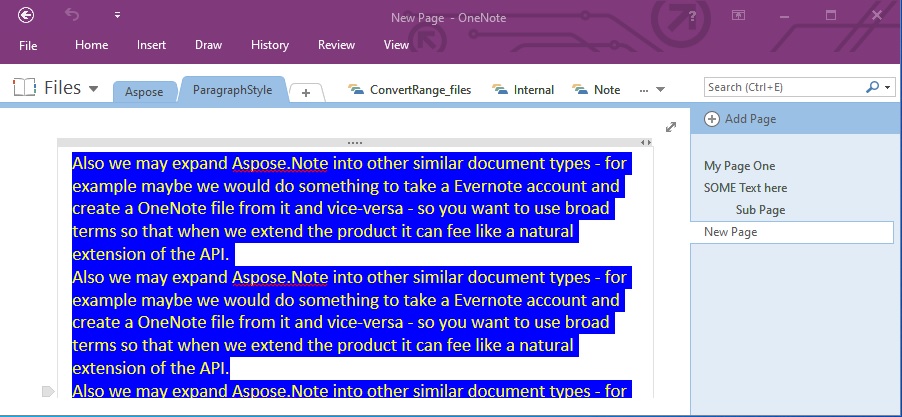
使用 C# 在 OneNote 中设置默认段落样式
我们还可以通过以下步骤在 OneNote 文档中设置默认段落样式:
使用 Document 类创建一个新文档。
使用 Page 类创建新页面。
初始化 Outline 和 OutlineElement 类对象。
创建 RichText 类对象并指定 ParagraphStyle。
然后,添加子元素。
最后,使用 Save 方法保存文档。
以下代码示例展示了如何使用 C# 在 OneNote 文档中设置段落的默认段落样式。
// Create a new document
var document = new Document();
// Create a new page
var page = new Page();
// Create a new outline
var outline = new Outline();
// Create an outline element
var outlineElem = new OutlineElement();
// Create style
var text = new RichText() { ParagraphStyle = new ParagraphStyle() { FontName = "Courier New", FontSize = 20 } }
.Append($"DefaultParagraphFontAndSize{Environment.NewLine}")
.Append($"OnlyDefaultParagraphFont{Environment.NewLine}", new TextStyle() { FontSize = 14 })
.Append("OnlyDefaultParagraphFontSize", new TextStyle() { FontName = "Verdana" });
// Append elements
outlineElem.AppendChildLast(text);
outline.AppendChildLast(outlineElem);
page.AppendChildLast(outline);
document.AppendChildLast(page);
// Save the document
document.Save("D:\\Files\\DefaultParagraphStyle.one");
获取免费许可证
您可以获得免费的临时许可证,在没有评估限制的情况下试用程序库。
结论
在本文中,我们学习了如何更改 OneNote 文档中页面标题或段落的文本样式。我们还看到了如何用 C# 编程添加带有文本样式的页面标题。利用 Aspose.Note for .NET,您可以轻松地将此类功能集成到您的应用程序中。如果有任何不清楚的地方,请随时与我们联系。






 渝公网安备50010702505508